GTM Strategy

How Modern Teams Connect Their Tools, Sync Their Data, and Trigger Revenue Actions Automatically - Powered by Datamorf
Introduction: Why GTM orchestration matters more than ever
"A go-to-market (GTM) strategy is a plan that details how an organization can engage with customers to convince them to buy their product or service and to gain a competitive advantage. A GTM strategy includes tactics related to pricing, sales and channels, the buying journey, new product or service launches, product rebranding or product introduction to a new market." Gartner
GTM without orchestration runs on fragmented data, disconnected tools, and manual processes that slow growth. Your CRM (HubSpot, Salesforce, or Pipedrive), your outreach tool, your marketing platform, your data enrichment sources, and your reporting dashboards rarely speak to each other in real time.
So GTM workflows end up looking like this:
Download CSVs
Copy/paste between apps
Update CRM fields manually
Push data to outreach platforms
Reassign ownership by hand
Notify people individually
Build reports manually
This is friction. And friction kills revenue.
GTM orchestration solves this by connecting your entire stack and turning your processes into automated, event-driven workflows.
And this guide will show you exactly how to orchestrate your GTM engine end-to-end using Datamorf as your central automation layer - without coding, without complex setup, and without ripping out the tools you already love.
Chapter 1 - What GTM orchestration actually means
GTM orchestration is the act of connecting your revenue tools, syncing data automatically, and triggering actions based on signals across your entire customer lifecycle. A GTM Engine isn’t just about acquiring customers, it’s about the entire lifecycle from awareness to renewal.
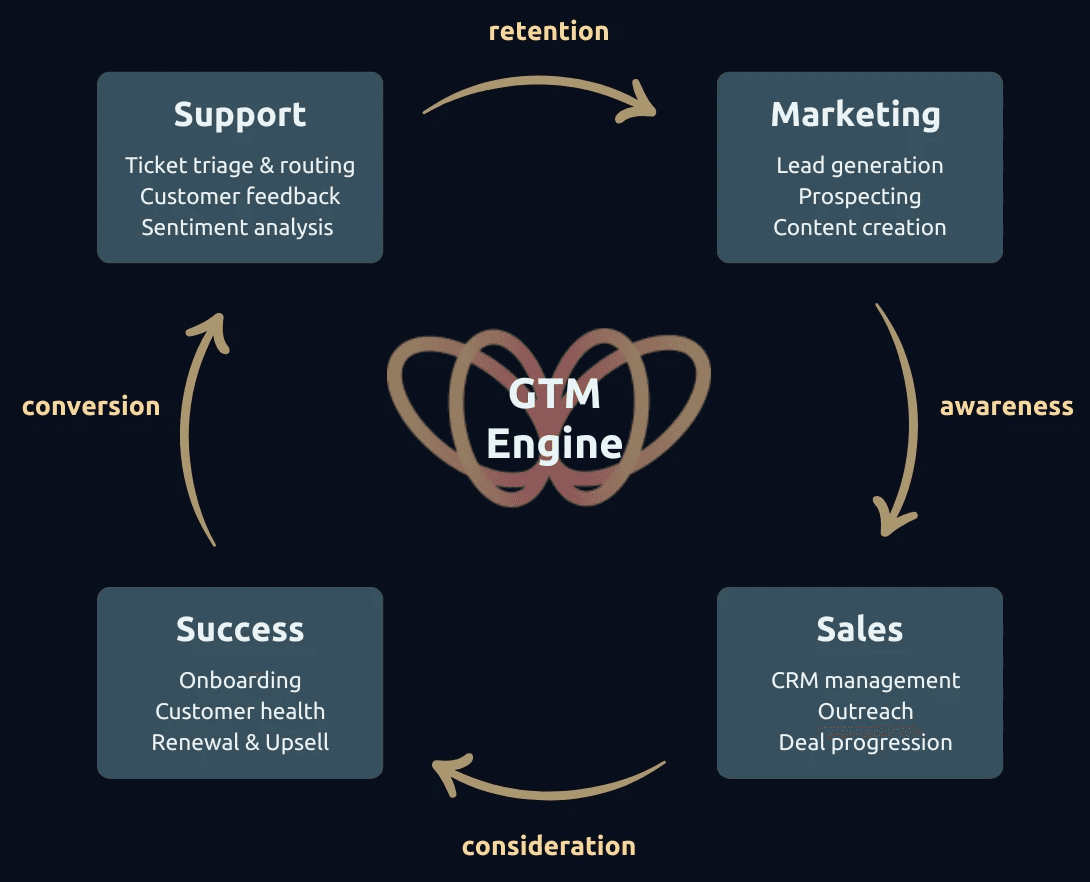
GTM orchestration means:
When a prospect engages, actions fire instantly across your tools.
When a new ICP lead lands in your CRM, enrichment and outreach trigger automatically.
When a deal progresses, tasks and alerts get created for the right teams.
When churn risk appears, the CSM is notified with context.
To orchestrate this, you need a central workflow engine.
Chapter 2 - Why Datamorf is the core of modern GTM automation
Datamorf connects all your GTM tools (CRM, outreach platforms, LinkedIn, enrichment tools, billing systems, support tools, and more) into a unified automation engine.
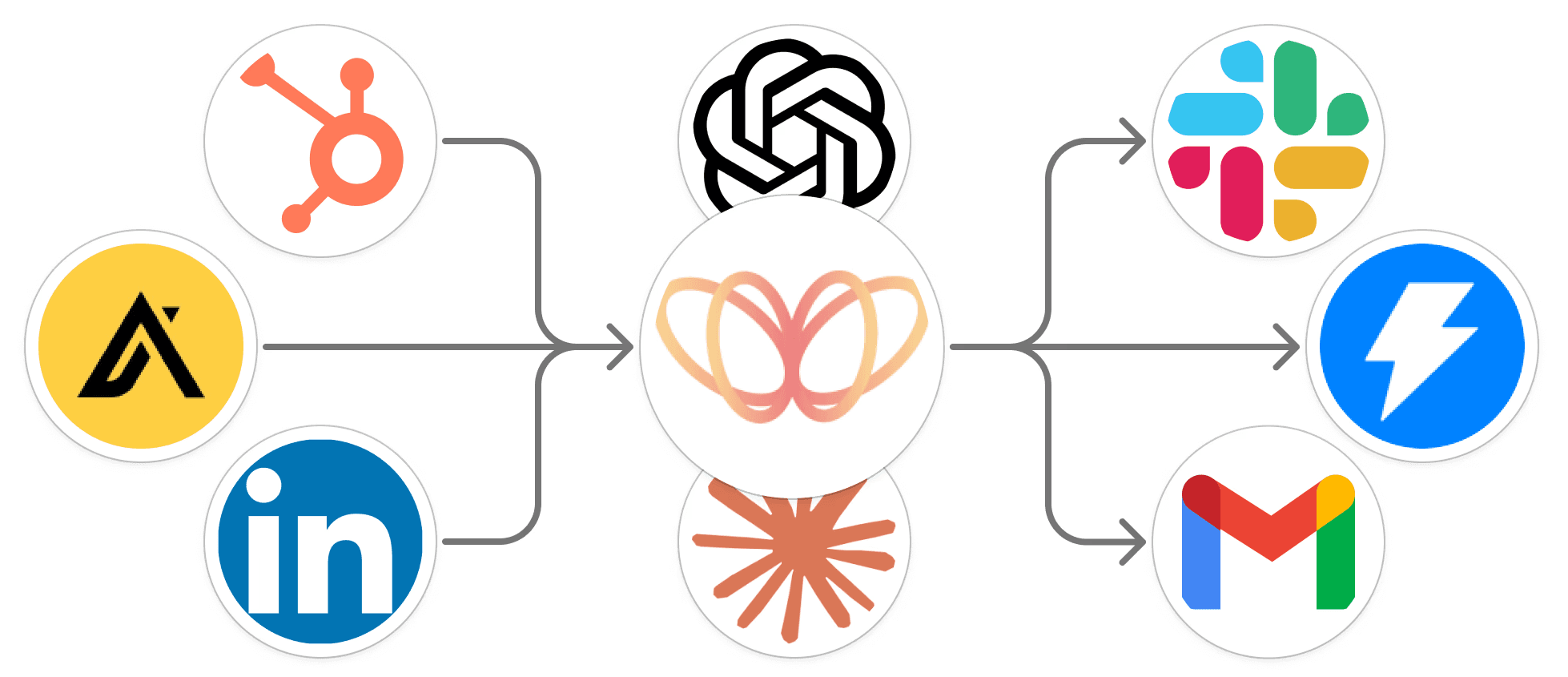
With Datamorf you can:
✔ Extract and enrich data from any GTM source
CRM, marketing platform, data warehouse, spreadsheets, APIs, etc.
Based on triggers like:
Form submissions
Intent signals
Deal updates
Product usage events
Website activity
Data changes
Schedules, …
✔ Transform it
Normalize fields, match objects, classify ICP fit, segment prospects, and more.
✔ Load it to the tools that need it
Your CRM, outreach platform, Slack, internal databases, reporting tools…
And because Datamorf is no-code, your GTM team can build these workflows themselves, not wait on engineering.
Chapter 3 - The GTM engine blueprint: 4 pillars you can reproduce
A GTM engine has four operational pillars: Marketing → Sales → Customer Success → Support.
In a simplified way, these map to the four core stages of the customer journey: Awareness → Consideration → Conversion → Retention.
However, it’s important to note that real customer journeys are not always linear and can involve additional stages or loops.
Each pillar produces key signals, and each signal should trigger automation.
To make this reproducible, here is a framework you can model inside Datamorf, regardless of what CRM, outreach platform, or analytics tools you use.
Pillar 1 - Marketing automation (awareness)
Goal: Turn anonymous visitors & leads into qualified, enriched, segmented contacts routed directly to sales.
Core signals marketing should track:
Website engagement (pricing page, demo page, etc.)
Form submissions
Content downloads
Webinar signups
Email campaign engagement
Ad conversions
ICP match based on company size/industry/role
Workflow | Trigger | Actions |
|---|---|---|
Automatic lead enrichment & routing | Someone submits a form or downloads content |
|
Intent-based prospect alerts | Prospect visits high-intent pages multiple times |
|
Smart lead recycling | A “Not Now” lead becomes active again |
|
Pillar 2 - Sales automation (consideration, conversion )
Goal: Remove repetitive admin tasks so reps spend time selling, not updating tools.
Core signals sales should track:
New lead assigned
First contact made
Prospect replies
Meeting booked
Deal moved stages
Stalled opportunity
Lost reasons
Workflow | Trigger | Actions |
|---|---|---|
Lead-to-meeting workflow | Lead assigned to an SDR |
|
Deal stage automation | Deal moves stages in CRM (e.g., “Demo Completed”) |
|
Opportunity stagnation recovery | Deal idle for X days |
|
Pillar 3 - Customer success (conversion, retention)
Goal: Drive adoption, prevent churn, and automate touchpoints without losing personalization.
Core signals success should track:
New customer onboarding
Low product usage
Ticket volume spike
Poor NPS or survey feedback
Renewal date approaching
Workflow | Trigger | Actions |
|---|---|---|
Automated onboarding kickoff | Deal marked “Closed-Won” |
|
Usage-based risk alerts | User activity drops by X% |
|
Renewal preparation | Renewal 90/60/30 days away |
|
Pillar 4 - Support automation (retention)
Goal: Turn support conversations into structured data that fuels product, sales, and CS.
Core signals support should track:
Ticket created
Ticket severity
Repeated issue
Ticket closed
Negative sentiment.
Workflow | Trigger | Actions |
|---|---|---|
Support → CS → product feedback loop | A ticket mentions a recurring feature request |
|
Account risk detection | More than X tickets in Y days |
|
Critical issue escalation | A high-severity ticket is created |
|
Chapter 6 - Bringing it all together: your reproducible GTM engine
Cross-department workflows should trigger each other to create a fully automated engine. For example the lead enrichment workflow trigger the sales workflow and the deal stage workflow trigger the onboarding workflow, etc,…
Across all 4 pillars, the structure is the same:
1. Detect a signal
Form submissions, intent, product usage, deal movements, support tickets.
2. Enrich and understand
Classify ICP fit, update CRM fields, gather context.
3. Trigger an action or sequence
Outreach, notifications, task assignment, document creation, data sync.
4. Sync data everywhere
CRM, outreach tool, CSM system, Slack, analytics dashboards.
This is the exact operating model Datamorf enables — without engineering.
Conclusion: the future of GTM is fully orchestrated
Companies that win have faster response times, higher personalization, connected data, and zero manual operations across their GTM teams.
This ebook showed you how to build that foundation, and Datamorf is the engine that makes it easy.
If you want:
More meetings
Faster pipeline velocity
Better customer experience
Higher retention
Stronger expansions
…it starts with orchestrating your GTM workflows end-to-end.
Share